Save the recipe.Plan the week.The list writesitself.
Browse 500+ free recipes, paste a link, or snap a photo of a recipe card. Add meals to your week, then send their ingredients to one shared shopping list. Check it off together, live, from any phone.
Free core features · No credit card · One short setup
From a recipe to the register, in three moves.
The part you do every single week — decide, plan, shop — wired end to end so you only enter anything once.

Every recipe you cook, in one book.
Start from 500+ curated recipes we keep free for everyone — filtered by vegetarian, vegan, gluten-free, dairy-free, kosher, halal, low-carb, Mediterranean, pescatarian, or omnivore. Add your own by hand, paste a link, or photograph a recipe card.
- 500+ curated recipes, free — no account tier, no trial
- Write your own recipes, unlimited, always free
- Paste a URL or snap a photo — 10 imports a month on the free plan
- A fresh curated drop lands every Sunday
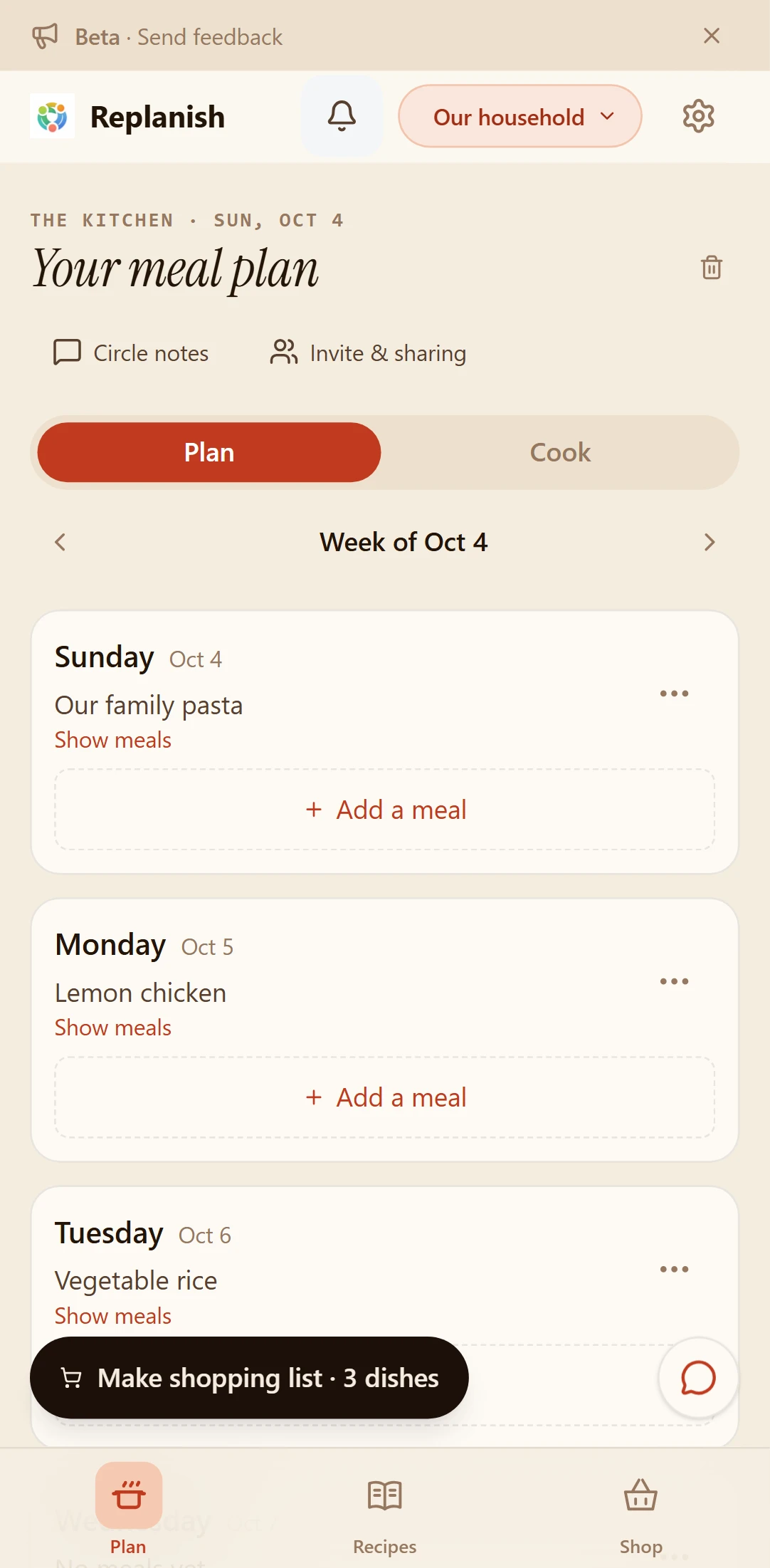
Put dinner on Tuesday. Done.
Start with dinner, or any meal you like. See your week at a glance. Tap Add a meal, search your recipes, and add your picks. Add breakfast, lunch or another meal when you need it. Your circle sees the shared plan update as you build it.
- Dinner first, with an Add a meal button for more
- Swap any dish you don't like in a tap
- Save a week as a template, or copy it forward
- The plan syncs live to every phone in the circle

One shared list, live in the aisle.
Send the week's ingredients to the shopping list and they arrive deduped — three recipes calling for onions become one line. Sort it to your actual store layout. Check things off while someone else adds to it from home. Type an extra item, tap Add, and keep typing — no reopening the field.
- Duplicate ingredients merge automatically
- Real-time — you check it off, they see it strike through
- Sort by your own store aisle order
- Works offline in the store; syncs when you have signal again
Replanish is early, and we build it in public with the people using it. Everything here works today — but you'll find rough edges, and when you tell us about one it usually gets fixed that week.
Tell us what's broken →Your circle. Your choice of sharing.
Start with just you. Invite your family or housemates when you are ready.
One short setup.
Give your circle a name, or use the default. Already invited? Enter your code. Go straight to your meal plan; preferences and themes can wait.
Shop together.
Invite people to your circle and choose the shopping list’s sharing options. Add items from home, check them off in the store, and see changes live.
Share a recipe, on its own.
Send an individual recipe link without giving someone access to your circle’s meal plan. Circle notes keep little reminders in one place. Choose one of four themes in settings.
Plan and shop free. AI is optional.
Your recipe book, meal plan and shared shopping lists are free, with no expiry and no card. Replanish AI is a small add-on for when you'd rather ask than tap.
Your meals, recipes and shared shopping.
- 500+ curated recipes across 10 diets
- Write your own recipes — unlimited
- 10 recipe imports a month (from a link or a photo)
- Full week meal planning, with reusable templates
- Unlimited shared shopping lists, in real time
- Works offline in the store · sorts to your store's aisles
- Pantry Picks — cook from what you already have
- Circle notes for the little things everyone needs to know
- Unlimited circles, unlimited people
- An in-app assistant that answers how-to questions
For when you'd rather ask than tap.
- Everything in Free, plus:
- No monthly cap on recipe imports from links and photos
- An assistant that helps you act — "add milk to the list", "put chicken and rice on the list" — instead of telling you where to tap
- Covers up to 4 people in your circle on one subscription
- Email support
- Includes a monthly AI allowance sized for normal household use. We show you in the app if you're getting close, and it resets on the 1st.
No tricks. Ask us anything.
Your recipes, lists and plans live inside your circle. Nothing leaves it unless you send it — a share link, an invite, an export you chose.
Not to advertisers, not to data brokers, not to anyone. Your household's habits are not the product.
The free plan doesn't need a card, so there's nothing to forget about. If you do subscribe, monthly ends at the period and yearly runs out the year you paid for.
Is it actually free, or free-for-now?
Is there an iPhone or Android app?
What counts against the 10 free recipe imports?
Can my household share one Replanish AI subscription?
What happens to my stuff if I cancel?
How many people use Replanish?
Still wondering something? Write to hello@replanish.app — a person answers.
Replanish started with one small ask — stop the group-chat scrolling just to figure out what to cook and what to buy. Save the recipes you love, put a few meals on the week, and turn the ingredients into a shopping list you can share. Your family or housemates can join your circle when you are ready. Each circle keeps its own shared plan.
It installs to your home screen in about ten seconds. No App Store, nothing to download, no 200MB update every other week — and it's always on the latest version. Once it's there it works like any other app: its own icon, full screen, offline shopping lists, push notifications.
- Open app.replanish.app in Safari.
- Tap the Share icon (square with an arrow).
- Choose Add to Home Screen → Add.
- Open app.replanish.app in Chrome.
- Tap the ⋮ menu (top-right).
- Choose Install app (or Add to Home screen).
— Built with real circles, not a focus group. Say hi at hello@replanish.app.
"What's for dinner?"
Answer it once.
A few meals you love. One list you can share. Start a circle or join yours in one short step.
Start free →Free core features · No credit card · One short setup